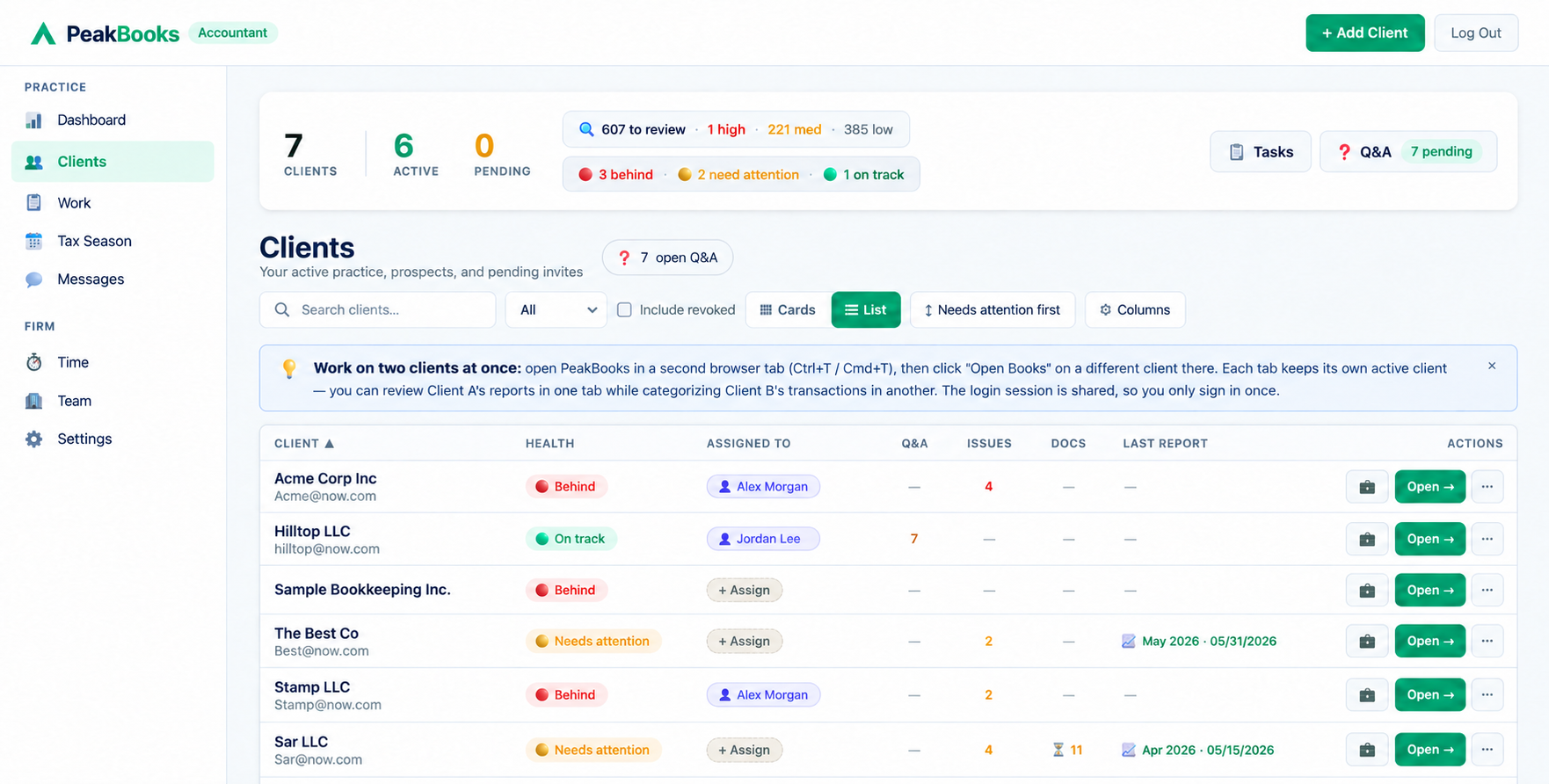
Your whole client base, one screen.
Health status, open questions, review findings and last report per client, with one-click entry into any client's books.
A workflow that respects your time
One Portal, Every Client
Switch between client books in two clicks. Their data is yours to read, comment on, and reconcile, without juggling logins, exports, or screenshares.
Built-in Q&A Workspace
Send questions about transactions directly inside the books. Clients see them in their dashboard and answer at their own pace. No more email ping-pong.
Audit-Trail Everywhere
Every edit, every reconciliation, every period lock is logged with the who, what, when, and why. Defensible records when it matters.
Sample Company Built-In
Practice in a fully-seeded demo client with realistic transactions before touching real books. Reset or remove anytime.
Real-Time Sync
You see what your client sees, the instant they see it. No nightly exports, no version mismatches, no "send me the latest QBO file" emails.
Free for Accountants
Your portal costs nothing. Clients pay for their own tier (Starter $19, Standard $49, Pro $89), or you cover them on a firm plan from $169/mo. Invite as many clients as your firm can handle.
Onboarded in under a minute
Sign Up as Accountant
Create your free firm account in 60 seconds. Choose "I'm an accountant" at signup. No payment required, ever.
Invite Your Clients
Send invite emails from your portal. Clients sign up and your firm is linked to their books automatically. They pick a tier, or you cover them on your firm plan.
Review & Categorize
Open any client's books like they were your own. Categorize transactions, reconcile accounts, run reports, lock periods.
Ask & Close
Send questions through the Q&A workspace. Clients answer at their pace. Close the books with a tamper-evident period lock.
Tax planning and season, handled
Built by an accountant for the work that actually fills January through April. Project each client's liability from their live books, then run the whole firm through the season on one board.
Tax Planning
Per-client projections that pull net income straight from the books. Federal brackets, self-employment tax with the 50% deduction, the 20% QBI deduction, a flat state rate, and recommended quarterly estimates, all computed live. Run multiple scenarios, work an editable tax-saving checklist, and send the client a clean tax-plan summary they can save as a PDF.
Tax Season Tracker
A firm-wide grid of every client across 11 stages, from bookkeeping done and 1099s filed through business and personal returns prepared, signed, filed, copied, and invoiced. Click a cell to advance it, stamp the date, and drop a note. Per-client progress at a glance, with one-click Export to Excel.
Home-Office Deduction
Calculate the deduction both IRS ways: simplified ($5/sq ft, up to $1,500) and the actual-expense business-use percentage, with a monthly/annual toggle. Post the result to the client’s books as an adjusting journal entry in one click.
Tax Organizer
Send each client a structured tax-season questionnaire to collect estimated payments, life changes, and the supporting details you need before you prepare the return, answered right inside their dashboard.
Everything you need to close the books
Designed by a practicing accountant who actually closes books — not a generic software team.
Client Management
Working in Client Books
Client Communication & Onboarding
Firm Operations
Clients on QuickBooks Online? Run them from here.
PeakBooks Workspace is a practice workspace for the clients who keep their books in QuickBooks Online. Connect their QuickBooks and your team gets one place to ask questions, collect documents, fix transactions, reconcile, close the month and send reports. Your clients get a simple portal. Nobody switches software.
Add a Workspace client and connect their QuickBooks Online company. Their books stay exactly where they are.
Your client gets a simple, secure portal for answering questions and sending documents. Portal logins are always free.
Review transactions, chase answers, reconcile, close and send reports, with your whole team on the same page.
Client questions
Ask about any QuickBooks transaction, or anything else. Clients answer on their secure page with replies, files and screenshots, and you hear the moment they do.
A portal your clients can use
Each client gets a secure, firm-branded page with no PeakBooks login to remember: their to-dos, questions, document requests, reports and organizers in one place. Add several people per client, each with their own permissions.
Document requests
Ask once or on a schedule, like every month's bank statements. Uploads land in folders you can mark reviewed, and secure share links expire when you say.
Fix transactions in QuickBooks
Categorize hundreds of transactions at once, change payees and classes, split lines, and add expenses, deposits and transfers. Changes go straight to the client's QuickBooks Online.
Month-end close
Stages from Not started to Closed, a preparer and an optional reviewer, due dates and a Behind flag. A checklist catches open questions, missing statements, uncategorized transactions and unreconciled accounts before you sign off.
Changes since sign-off
If someone edits QuickBooks after a month is signed, you see exactly what moved: transactions added, changed or removed, the balance impact, and which approvals to repeat.
Close board
Every client's month on one board: stage, preparer, reviewer, due date, and whose move it is. Spot who is behind before the client does.
Reports and report packages
Pull QuickBooks reports live: P&L, Balance Sheet, Cash Flow, Trial Balance, General Ledger, A/R and A/P aging, and more. Filter, save a PDF, or email the client a package built from your own template.
Account review and reconciliations
Review every account month by month with notes and variance explanations, and see each bank and card account's last reconciliation and what is still unreconciled.
A weekly email that chases for you
Each client gets an automatic weekly email listing what is open and what is new, on your schedule and in your wording. Remind anyone right now with one click.
Tax organizers, W-9s and loans
Send tax organizers clients fill in from their portal, with last year's answers carried forward. Collect W-9s from vendors QuickBooks flags for 1099s. Track client loans and split each payment in QuickBooks.
White label on Growth and Scale
Put the client portal on your own address, like portal.yourfirm.com, and send client email from your firm's own address. Set it up yourself: add the DNS records we show you and click Check.
Priced by seats and connected clients
A seat is a person on your team who works in the Workspace. A client counts only while its QuickBooks Online company is connected. Your clients' portal logins never use a seat and never cost extra. Billed monthly; cancel anytime.
- ✓ 1 staff seat (you)
- ✓ 15 QuickBooks-connected clients
- ✓ Client portal logins free, never a seat
- ✓ Questions, documents, close & reports
- ✓ 3 staff seats, you included
- ✓ 50 QuickBooks-connected clients
- ✓ Client portal logins free, never a seat
- ✓ Questions, documents, close & reports
- ✓ White label: your portal address & your email address
- ✓ 10 staff seats, you included
- ✓ 150 QuickBooks-connected clients
- ✓ Client portal logins free, never a seat
- ✓ Questions, documents, close & reports
- ✓ White label: your portal address & your email address
Your firm's first Workspace plan starts with a 7-day free trial (card required; cancel before it ends and you pay nothing). Any active firm plan includes Essentials at no extra charge. Only the firm owner buys plans and add-ons and chooses who holds a seat, from Settings → Plan. Full terms in Terms of Service §6.8.
Sign up free as an accountant, then choose a plan in Settings → Plan.
Keep your own firm's books — free
Your accountant account isn't just for clients. Open 🏢 My Business from your portal and run your own firm's bookkeeping right alongside them, with the full Pro toolkit at no extra cost. Same login, same tools you already use for clients, zero setup.
Get paid on the clients you bring
Your firm earns a share of every subscription payment your clients make to PeakBooks for their own plan. Each client's rate is set by their position in your book and locked for good: the more of your practice you run on PeakBooks, the more every new client pays you back.
A program dashboard tracks every client, every payment, and what you earn on it, month by month. Payouts go out by ACH quarterly once your balance reaches $100 (W-9 required; 1099-reported where the law requires). Refunded payments give back their commission. Only subscriptions business owners pay for themselves count: firm plans never earn commission, and commissions pause while your firm has one. Full details in the Terms of Service §6.6–6.7.
Create your free firm account →We'll never compete for your clients
PeakBooks is software — not a bookkeeping service. We don't sell bookkeeping, tax prep, or "live experts" to your clients, and there's no marketplace quietly routing them to someone else. Billing runs directly between the client and PeakBooks, or through your firm if you cover them on a firm plan. We never upsell them off you. The relationship, the advice, and the invoice stay yours.
No competing services sold to your clients
No "find an accountant" marketplace
We never upsell your clients off you
Your clients' data, protected like your license is on the line
You're responsible for every client's data. So are we.
Every client walled off
Row-level security isolates each client's books at the database. One client can never see another's data, and neither can any other firm.
Bank logins we never see
Connections run through Plaid: credentials go to the bank, never to us. Card payments run through Stripe.
Sensitive fields encrypted
SSNs, EINs, and bank account numbers are encrypted at rest with AES-256-GCM; everything travels over TLS.
Your portal is free. Always.
Your firm portal, team members, sample company, and audit logs cost nothing. Then choose how client subscriptions get paid: each client pays for its own tier, or your firm covers them on one monthly plan.
Free forever, no card required
Sign Up as Accountant- ✓ Unlimited clients
- ✓ Unlimited team members
- ✓ Sample/practice client
- ✓ Q&A workspace
- ✓ Task board
- ✓ Time tracking
- ✓ Two-factor authentication
- ✓ Audit log
- ✓ Secure share links
Each client chooses their own tier based on how complex their books are. You can recommend a tier when you invite them.
- ✓ 1 bank/CC account
- ✓ Automatic categorization
- ✓ 10 invoices/mo
- ✓ Monthly P&L statement
- ✓ 5 bank/CC accounts
- ✓ More automation included
- ✓ 50 invoices/mo
- ✓ Bills 25/mo
- ✓ Full reports + recs
- ✓ Budget vs Actual
- ✓ 2 team seats
- ✓ 10 bank/CC accounts
- ✓ Most automation included
- ✓ Unlimited invoices
- ✓ Unlimited bills
- ✓ Unlimited classes & locations
- ✓ S-Corp comp calculator
- ✓ Bulk doc requests
- ✓ 7 team seats
Or cover your clients on one bill
Pay for your clients' PeakBooks yourself and bill them your way. Covered clients get every Pro feature and never see a PeakBooks invoice. Clients who pay for themselves don't use a slot, so you can mix both. Billed monthly; cancel anytime.
- ✓ 10 clients covered
- ✓ 30 bank & credit card accounts, shared
- ✓ $20/mo AI allowance, shared
- ✓ Every Pro feature for covered clients
- ✓ Unlimited staff
- ✓ 30 clients covered
- ✓ 90 bank & credit card accounts, shared
- ✓ $60/mo AI allowance, shared
- ✓ Every Pro feature for covered clients
- ✓ Unlimited staff
- ✓ 75 clients covered
- ✓ 225 bank & credit card accounts, shared
- ✓ $150/mo AI allowance, shared
- ✓ Every Pro feature for covered clients
- ✓ Unlimited staff
Add or remove extra clients and bank accounts anytime in Settings → Plan (never below what you're using); changes are prorated, and if you cover a client that doesn't fit, PeakBooks offers to add the room first. Each extra client also adds $1/mo to the shared AI allowance, which resets on the 1st of each month. The bank pool counts every connected or manual account across your covered clients. Firm plans never earn Partner Program commission, and commissions on your self-paying clients pause while a firm plan is active. Full terms: Terms of Service §6.7.
Start free, add a plan when you're ready →Common questions
Run your firm.
Stop running software.
Sign up free, invite your first client, and have their books reconciling by the end of the day.
Sign Up Free →No credit card. No client minimums. Cancel anytime (but it's free).